

Our Unique Apps
Now available Free and Online
Secure server-free editing
| mp3TrueEdit™ |
|---|
 |
| Windows 10+ | macOS 11+ | iOS 14+ | Android 8.0+ |
    |
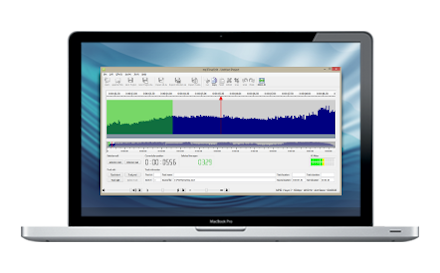
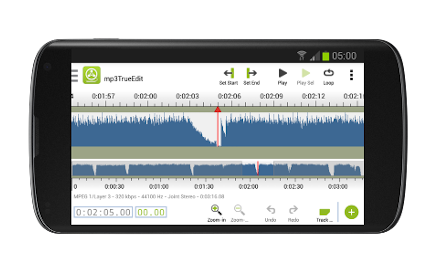
mp3TrueEdit is the fastest, most accurate and easiest way to edit MP3 audio files we know. Now with AAC* file support you can edit your entire music collection with ease and record your own audio in MP3 or AAC* file formats.
mp3TrueEdit does all its audio editing without any quality loss or file corruptions as it doesn't need to decompress and re-compress audio in order to make any edits. It's lightning fast, even with large audio files. It also preserves all the information in the MP3 frames preventing clicks, pops and other glitches that competing editors can generate. If required, you can now also convert your edits to a new file format or encoder settings including any pitch and tempo changes. Using the convert feature will involve some loss of quality though.
mp3TrueEdit is not only excellent for editing music you can also record and listen to meetings, lectures and talks and slow them down so you don’t miss a word or speed them up and accelerate your learning. You can also record rehearsals, band practice sessions or choirs and change the playback pitch (key) or tempo (speed) to suit your own practice needs.
| easy Record and Trim™ |
|---|
 |
| macOS 11+ |
|
This free and easy to use recording software allows you to record MP3 files and also AAC* audio files directly and then trim the recordings without any quality loss.
Now available on the Mac App Store
With 'easy Record and Trim' you can record MP3 and AAC* audio from your microphone or the line-in of your audio interface, then save the audio and open to view your recording in a quick and simple to use interface. The audio can be trimmed with a few simple commands explained by some unique popup guides.
In addition, Apple Mac users can upgrade to the 'Pro' version at any time to enjoy the same full editing features of our flagship product mp3TrueEdit™.
Our Unique Features

Music Editor
Edit your music collection to remove unwanted parts or even create a DJ set by joining songs.

MP3 Cutter
Create audio tracks with tagging information to allow easy mp3 cutting.

Add Effects
Additionally, mp3TrueEdit can fade in, fade out, change volume or normalize any audio section.
Desktop
Mobile
Powerful Playback Controls
When playing back audio change the tempo (speed) without affecting the pitch or change the pitch (key) without changing the tempo. Great for transcribing audio or learning a new language or musical piece. You can now also convert files to optionally include pitch or tempo changes (with some quality loss).
Fast
Loads a two-hour audio file in a couple of seconds, much faster than popular waveform editors. Also includes fast and accurate trimming, fade, normalization and other editing operations.
Save Disk Space and Time
There's no need to decompress and recompress the audio stored in the audio files, so this avoids having to create large slow loading intermediate files.
Multiple Undo and Redo
No need to worry about making changes or experimental edits - everything can be undone and redone quickly and easily.
Quickly View & Find Audio
Quickly view and find the audio section you are looking for and play using the built-in player.
Easy to Follow Tutorial
Simple task-based examples of the best way to use mp3TrueEdit™. An informative FAQ that will answer most user's queries. Helpful notes on how to get the best out of your computer’s audio capabilities.